Browse the docs
Docs›Working on X
Keyboard shortcut FREE
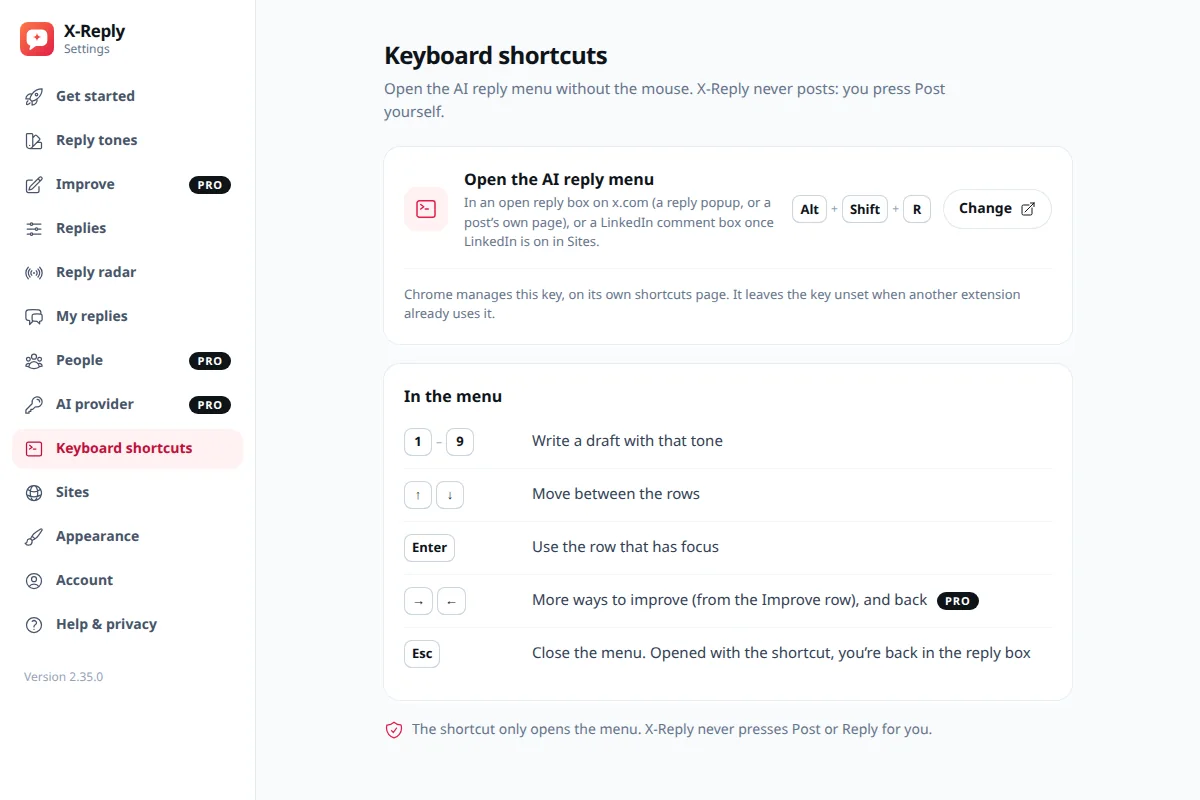
Open the AI reply menu from the keyboard with Alt+Shift+R, then pick a tone with its number key. Change the shortcut in Chrome’s settings.
Free for everyoneAdded in 2.12.0Settings › Keyboard shortcuts
How to use it
- 1Open a reply box on X and press Alt+Shift+R (Chrome suggests this key; your computer may show another).
- 2The AI reply menu opens. Press 1 to 9 for a tone, E for Explain (Pro), the arrow keys to move, Esc to close it and go back to the reply box.
- 3Settings › Keyboard shortcuts shows your key. Change opens chrome://extensions/shortcuts, where Chrome lets you set it.
- 4It never posts: X-Reply never presses Reply or Post for you.
See it in action · 0:08On a demo X page with made-up people. Nothing is posted.
- Click in a reply box
- Press Alt+Shift+R to open the AI reply menu
- Press a number to write a draft
If something goes wrong
- “Open a reply box first”
- Press Reply on a post, or open the post itself, then use the shortcut again.
- The shortcut shows “Not set”
- Another extension took the key, or Chrome didn’t assign it on an update. Press Set a shortcut and pick one.
Still stuck? Help and contact.