Browse the docs
Docs›Writing replies
Pick the AI model PRO
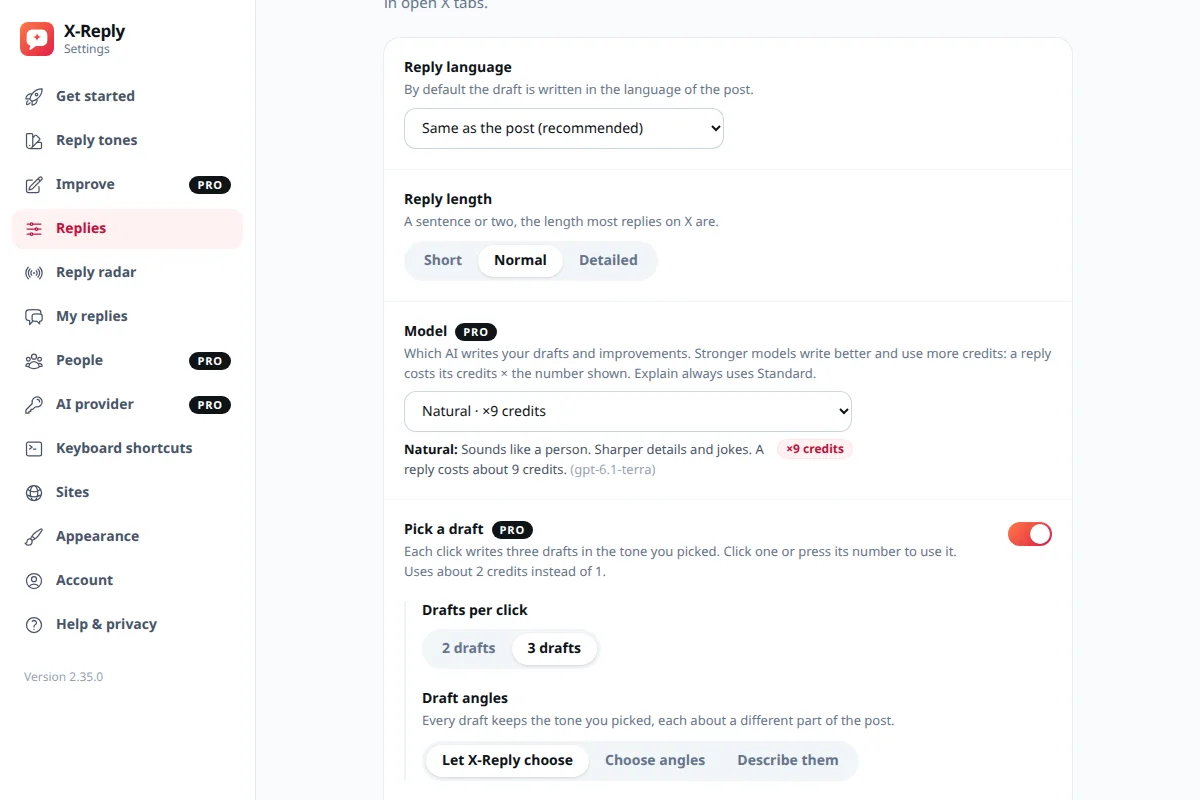
Pick which AI writes your drafts: Standard, Clean, Natural or Best. Stronger models use more credits per reply, shown as ×9 or ×17.
Part of X-Reply ProAdded in 2.15.0Settings › Replies › Model
Pro: $7.99 a month or $49 a yearHow to use it
- 1Open Settings › Replies › Model.
- 2Pick a model: Standard (the default, fast), Clean (a newer model with plainer words, ×1), Natural (sounds like a person, ×9) or Best (the strongest writer, a little slower, ×17).
- 3While Natural or Best is picked, the AI reply button shows ×9 or ×17 and the menu names the model.
- 4Credits are counted from what the model really used, times its multiplier. Explain always runs on Standard at 1 credit.
- 5The list comes from X-Reply’s server and can change. If your model is dropped, Standard takes over.
See it in action · 0:08On a demo X page with made-up people. Nothing is posted.
- Open Settings › Replies › Model
- Pick a model. Its credits per reply show next to it
- On X, the menu shows the model you picked
What is sent where
The same as any draft, plus which model you picked. With your own AI key, the key’s model is used and this one only when the key fails.
More in What is sent where and the privacy policy.
If something goes wrong
- “The Natural model isn’t answering right now. Try again, or pick another model in Settings › Replies.”
- That model’s service failed and nothing was charged. Try again, or pick another model.
- “no longer offered” next to your model
- It was taken off the list. Standard is used until you pick another.
Still stuck? Help and contact.