Browse the docs
Docs›Working on X
Save a post to reply later FREE
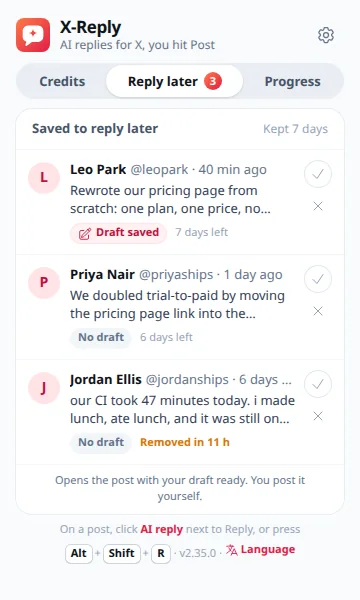
No time to reply now? Save the post, with the draft in your reply box, and come back to it from the toolbar popup within 7 days.
Free for everyoneAdded in 2.19.0Settings › Replies › Reply later button
How to use it
- 1On a post, click the clock next to AI reply, or Reply later at the bottom of its menu.
- 2X-Reply keeps the post’s link, its author, its first 140 characters and the draft in the reply box, if there is one. Click the clock again (or Undo) to take it out.
- 3Open X-Reply’s toolbar popup › Reply later and click an entry to open the post.
- 4Your saved draft waits in a card: Insert draft puts it in the reply box for you to edit and post yourself.
- 5✓ Done or × takes a post out, replying to it does too, and after 7 days it goes on its own. Settings › Replies › Reply later button hides the clock.
See it in action · 0:12On a demo X page with made-up people. Nothing is posted.
- Click the clock next to AI reply
- The post is saved with your draft for 7 days
- Open the popup › Reply later to come back to it
If something goes wrong
- “Open the post to save it”
- X-Reply couldn’t find the link to this post in the reply popup. Open the post itself, then click the clock again. Nothing was saved.
Still stuck? Help and contact.